Quick Exit
Quick Exit
The quick exit button allows you to leave a webpage immediately. It may be useful if you do not want someone else to see what you are looking at.
On our website, there is a quick exit link in the navigation bar at the top of the screen. There are also quick exit buttons used throughout this website on pages with sensitive content. If you click on the quick exit link or button, it will take you to Google and close the Nillumbik Youth website.
Quick exit link at top of screen:
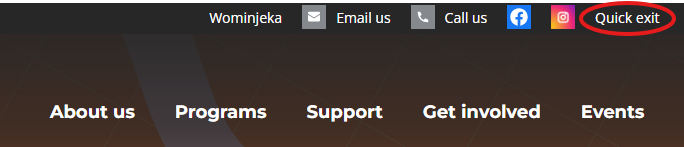
Quick exit button in content of webpage:
Using the quick exit does not delete your browser history. This means that if someone else looks at your browser history, they will be able to see which webpages you have visited. You can delete this history in a separate step.
How to browse safely
When you do an internet search or visit a webpage, your web browser keeps a history of this online activity. Examples of browsers include Google Chrome, Microsoft Edge or Safari. The browser history makes it easier for you to return to a website you have looked at before. It also means other people can see which sites you have visited.
You can delete your browsing history by going into your browser’s settings.
Find out how to clear your history on:
Within your browser’s settings you can also choose to browse in Private or Incognito mode. This means that your browser won’t save your browsing history, cookies or site data.
Tips for staying safe online
To stay safe online:
- set strong passwords
- change passwords regularly
- browse in private or incognito mode
- clear browser history
- use public devices (such as in a library) and clear the browser history when you finish.
Resources
For more information on how to stay safe online, visit: